
Vori changelog
Approve Chip's suggestions right from the chat

This week, Chip can act on its suggestions with one tap, and invoices with weighed items come through more completely.
Approve Chip's suggestions right from the chat
When Chip spots something worth doing, you shouldn't have to leave the conversation to do it.
Approve or decline Chip's suggested actions directly in the chat on the handheld.
Open charts and tables full screen so they're easy to read on the floor.
Rate any answer with a thumbs up or down to help Chip get better at your store's questions.
Where to find it: In the Back Office or Handheld› Chip →
On the handheld
Mark items as prepackaged. A new Prepackaged product attribute.
Register a whole box of shelf labels at once. Stores with electronic shelf labels can add a new box of labels in one step.
In Back Office
Invoices with weighed items read more completely. Catch weights, per-item weights, and lines without a pricing basis now come through, so fewer lines need fixing by hand. Review invoices and cost changes →
Questions about any of these? Reach out to your Vori team at [email protected] or 415-779-0021
Faster promotions and store-targeted text campaigns

This week, setting up a promotion on the handheld takes fewer taps, and you can text just the shoppers who shop at a specific store. Two reports also show you more about where your product and margin go.
Text the shoppers who shop at a specific store
Hosting a tasting at one location or changing its hours? You can now send a custom campaign only to shoppers who recently bought at the stores you pick.
Choose Recent shoppers at specific stores as your audience.
Pick the stores, then set how many days back to look, like the last 30 days.
Where to find it: Back Office › Marketing › Custom Campaigns · Send a campaign to recent shoppers →
On the handheld
Build promotions from a product group. Pick a group you've already set up instead of adding items one at a time. Create a promotion on VoriOS →
Check prices before you link them. When you link retail price across a product group, the handheld shows each item's current price first.
Daily promotions now need a time of day, matching Back Office, so a daily deal runs exactly when you expect. Set a promotion's schedule →
Reporting
Item Sell-Through by vendor. See each product broken down by vendor, or group the whole report by vendor to compare how each vendor's items sell. (Available with Use the Item Sell-Through report →
Shrink report shows the why. Every item now lists its shrink reason and total cost, so you can see where losses come from.
Fixes
You can edit vendor items again even when the vendor is inactive.
Ordering no longer records the same scan twice.
Questions about any of these? Reach out to your Vori team at [email protected] or 415-779-0021
SNAP and WIC items now stand out at the register
This week's register update makes benefit checkouts smoother. SNAP and WIC items are marked right on the lane, and voided orders are easy to find again.
SNAP and WIC items stand out at checkout
When a shopper pays with benefits, cashiers shouldn't have to guess which items qualify. The register now shows them.
SNAP and WIC badges appear on eligible items in the basket.
If an item should qualify but isn't set up that way, a cashier can mark it SNAP eligible at checkout. Turn on Mark Item as SNAP Eligible under Manager Approvals to require a manager's OK first.
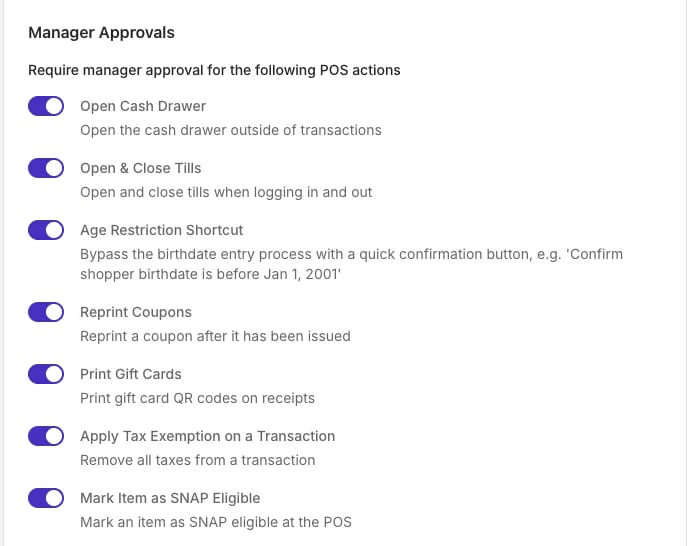
Where to find it: Back Office › Point of Sale › POS Settings › Manager Approvals · Set up manager approvals →
At the register
Find voided orders fast. A new Voided tab lists every voided order, so you can reprint its receipt when a shopper asks.
Clear confirmation on voids. The register now shows a message when an order has been voided.
On the handheld
Keep products in active departments. When a product's department is deactivated, the handheld prompts you to choose a new one.
Fixes
Receipts print quotation marks and dashes correctly.
Weighed items are no longer mislabeled on the handheld.
Product edits stay with the right store after you switch stores on a handheld.
Questions about any of these? Reach out to your Vori team at [email protected] or 415-779-0021
Design your own shelf tags and print every price change

Your shelf tags can now look like your store and keep up with your prices. Starting this week, every Vori store can design its own tags in Back Office and print every price change from one queue, on the printer you already have.
Design your own tags and print every price change from one queue
A tag that doesn't match the register means an unhappy shopper and a trip to the service desk. Now when a cost change turns into a new retail price, the new tag shows up in your print queue on its own.
Make tags that look like your store. Use your fonts, logo, and layout. Build one template for regular retail and one for each deal you run, like price reductions or Buy X Get Y. Design your own tags →
Set it once for every product. Assign a template to one product, a whole department, or use a Product Rule so new items are covered too. Assign tags to products →
Print what changed, nothing more. Any price, name, or barcode change adds the tag to your queue, whether it was made in Back Office or on the handheld. Print next week's promo tags ahead of time, sort by aisle, and start on a half-used sheet. Work through your print queue →
Use the printer and labels you already have. Vori sizes every print to your sheet labels, including common Avery, Online Labels, and RTI stock.
Templates you build work at every store under your banner. Custom tags are free for every store during the open beta, through December 31, 2026.
Where to find it: Back Office › Tags · See how custom tags work →
Questions about custom tags? Reach out to your Vori team at [email protected] or 415-779-0021.
Reports that used to time out now finish in seconds

This month your reports got dramatically faster, three new reports landed in Back Office, and cashiers can now take a discount off the whole basket in one step.
Reports that finish in seconds
Waiting on a slow report is time you could spend on the floor. Reports that used to take over 30 seconds, or time out, now finish in under 3, even with more stores running them than ever.
The slowest reports went from 18.6 seconds to 2.2 seconds.
Filter any report by time of day, not just date. For example, sales between 2 and 3 p.m. yesterday.
The Inventory Levels report shows what you had on hand as of the end date you pick.
Where to find it: Back Office › Reports
Reporting
Compare what you bought with what you sold. Item Sell-Through shows ordered, invoiced, received, and sold for every product, by vendor or department. (Available with inventory tracking. Open Item Sell-Through →
See which aisles and shelves sell. Item Sales By Location uses each product's location at the time of sale, so you can compare before and after a move. View sales by location →
Manage every scheduled report from one page under Reports › Scheduled Reports. Edit your scheduled reports →
Match card payments to your deposits. Finances › Card Deposits lines up your card sales with CardConnect funding and flags mismatches. (For stores processing with CardConnect. Reconcile your card deposits →
At the register
Discount the entire basket. Tap Entire Basket on the Discounts screen, and the discount stays as you add items. Apply a basket discount →
Run promotions on weighed items. BOGO, combo, minimum spend, and shopper group promotions now apply to random-weight items at checkout.
Combo deals give shoppers the best value, pairing the least expensive qualifying item with the most expensive benefit item. See how combo offers work →
Send food orders to the kitchen from any lane with Orders › Submit Food Order. Set up food service orders →
Check a price by typing the PLU. Check a price at the register →
The cash drawer opens at till close, even when a count isn't required.
On the handheld
Set up a new handheld in under a minute. The first download takes about 50 seconds instead of 5 minutes.
Rename inventory counts any time. Manage inventory counts →
Record shrink for Store Use and Sample. Record shrink →
Filter the tag queue to an exact day. Print tags on the handheld →
See both units when ordering, like 3 cases = 72 eaches. PIN unlock is faster too.
In Back Office
Check your electronic shelf labels under Tags › Electronic Shelf Labels. See which are online, paired, or low on battery. Check ESL status →
Ask Claude about your store. Vori is now in Claude's connector directory. Connect it and sign in with your Vori login. Connect Vori to Claude →
Fixes
The register can't be used without an open till, and a till can't be opened twice.
WIC cash-value benefit requests no longer go over the shopper's balance.
Cashback options show reliably on the customer-facing screen.
Bottle deposit refunds print with barcodes, and gift card scans work in any letter case.
Fewer handheld freezes, deleted promo offers stay hidden, and EAN-13 tags print correctly without cut-off text.
Questions about any of these? Reach out to your Vori team.
Send daily sales and vendor bills straight to your books

This month your daily sales and approved vendor bills can go straight to your accounting software, your team can build one order together from several handhelds, and cashiers get clearer control over discounts and till amounts at the register.
Your daily close and vendor bills, posted to your books
Re-keying sales totals and invoices into your books every night is time your bookkeeper never gets back. Connect QuickBooks Online, QuickBooks Desktop, or Xero, and Vori sends the numbers over already coded to your accounts.
Push one daily sales journal entry per store, built from your End of Day report and broken out by department.
Approved vendor invoices post as bills, ready to pay in your accounting software.
Map your sales, tenders, and departments to your own chart of accounts once, then reuse it every day.
Nothing posts on its own. A person on your team reviews and pushes every entry.
Where to find it: Back Office › Integrations › Accounting Sync · See how accounting sync works → (Available as a paid add-on.)
On the handheld
Build one order as a team. Several people can add to the same order from different handhelds and see each other's changes within seconds.
Fewer double orders. The handheld warns you when an item was ordered in the last 24 hours, and you can turn the warning off in Ordering Settings.
Catch expiring product before shoppers do. Scan items with Date Check and work from a list sorted by what expires next. Start a Date Check →
Finish inventory counts with one button that commits the count or sends it to a manager, based on your review settings. Run an inventory count →
Find products faster. PLU items show first in search, brand-new items turn up before they finish syncing, and you can edit a product's description on the spot.
Print the vendor item code on shelf tags again. Set up your tag details →
Tap the sales graph on any product to see the numbers behind each bar.
Staff see only what their role allows. Tools they can't use fold into one "Features locked" button, and the handheld asks everyone to sign in again every 48 hours.
At the register
Decide whether cashiers see till amounts. Turn off Allow Cashiers to View Till Amounts in your POS settings. Managers can always see them. Update your till settings →
Discounts a promotion doesn't allow are grayed out, so cashiers know at a glance what they can apply. Manage discounts at the register →
House account names print on receipts. Manage house accounts →
In Back Office
See every connection in one place. The new Integrations tab shows what's connected, from accounting to deli scale sync, and what else your store can add. Browse your integrations →
Fixes
Gift card refunds now link to the right order.
Countertop scales hold steadier at checkout.
The register no longer shows a promo price when a promotion is limited to a shopper group.
Fixed a register crash caused by the customer-facing screen.
The handheld sales tab shows your store's time zone, and creating a product with a bad barcode now explains what's wrong.
Questions about any of these? Reach out to your Vori team.
Count, restock, and record shrink in one handheld session

July put more of the store in your hand. You can now count, restock, and record shrink in one inventory session, set shelf locations for every item, and work through price changes and tag printing faster from the handheld.
Count, restock, and record shrink in one session
Updating inventory one item at a time eats up a shift. Inventory sessions let your team work an aisle in one go, and a manager can check the numbers before they change.
Choose a mode: Count replaces on-hand with what you counted, Shrink subtracts spoiled or damaged items, and Restock adds what you put on the shelf.
Scan or search items, enter quantities, and see cost as you go.
Commit right away, or submit for review so a manager approves the changes in Back Office first.
Where to find it: the handheld › Inventory › Start Session · Run your first inventory session →
On the handheld
Know where every item lives. Add an aisle, section, and shelf to any product from the new Locations tab, or from the product page in Back Office. Add a shelf location on the handheld → Add one in Back Office →
Do four jobs from Bulk Actions. Scan a run of items to print tags, change prices, edit details, or assign shelf locations as you walk the store. Print tags from Bulk Actions →
Print tags from a cleaner queue. Dismiss tags you don't need, cancel a big print job, and filter the queue by aisle to print in walking order.
See vendor items the same way as in Back Office on a product's details.
Tiles your role can't use are locked, and a quick message explains why when someone taps one. See what each role can do →
At the register
Split a payment across gift cards. Shoppers can pay with more than one gift card in a single order. Redeem a gift card →
Refund manufacturer coupons when the original order used one. Process a refund →
Manager approval comes first when pausing an order, before the cashier picks a reason.
Tare stays honest. The register won't accept a tare heavier than what's on the scale. Manage tare containers →
Spot a scale problem fast. The scale shows as disconnected when it stops responding.
The customer-facing screen restarts itself after 10 orders without a tap, so it stays responsive.
Fixes
The register no longer freezes for a few seconds at a time.
Food orders no longer submit twice.
Offers apply to $0 food items, and basket offers on $0 items no longer cause a crash.
eWIC payments go through more reliably when the processor sends an unexpected response.
Receipts show the right tax labels.
Questions about any of these? Reach out to your Vori team.
Order by department and keep every buyer on track
June was about getting orders right the first time. Your buyers can now order by department, and loyalty deals at the deli counter count every modifier.
Order by department and keep every buyer on track
When one person orders grocery and another orders dairy, it is easy for items to land on the wrong order. Now each buyer can stick to their own department.
Pick a department when you start an order, on single vendor and multi vendor orders.
If you scan or search for an item from a different department, the handheld flags it before it goes on the order.
Product search remembers your department and fills it in for you on department orders.
Where to find it: the handheld › Ordering › Start a New Order › Department · Start an order by department →
On the handheld
Sort your cart the way you shop the order. Sort ascending or descending on any option, and sort by brand to keep a vendor's lines together.
Enter case sizes with decimals for items that come in partial or weighed cases.
Promotions and coupons you build on the handheld save straight to Vori. Create a promotion on VoriOS →
At the register
Deli deals cover the whole sandwich. Offers and loyalty rewards now apply to food modifier prices, and shoppers earn loyalty points on them too. Set up item modifiers →
Prices stay lined up on receipts, even when an item name runs long.
In Back Office
Find a gift card in seconds. Scan its barcode or swipe its magstripe on the gift card page instead of typing the number. Manage gift cards →
Fixes
Items you add right before submitting an order now always make it onto the order.
Orders use your latest vendor item details, so you don't order from outdated vendor info.
Creating and canceling promotions on the handheld works as expected again.
Questions about any of these? Reach out to your Vori team.